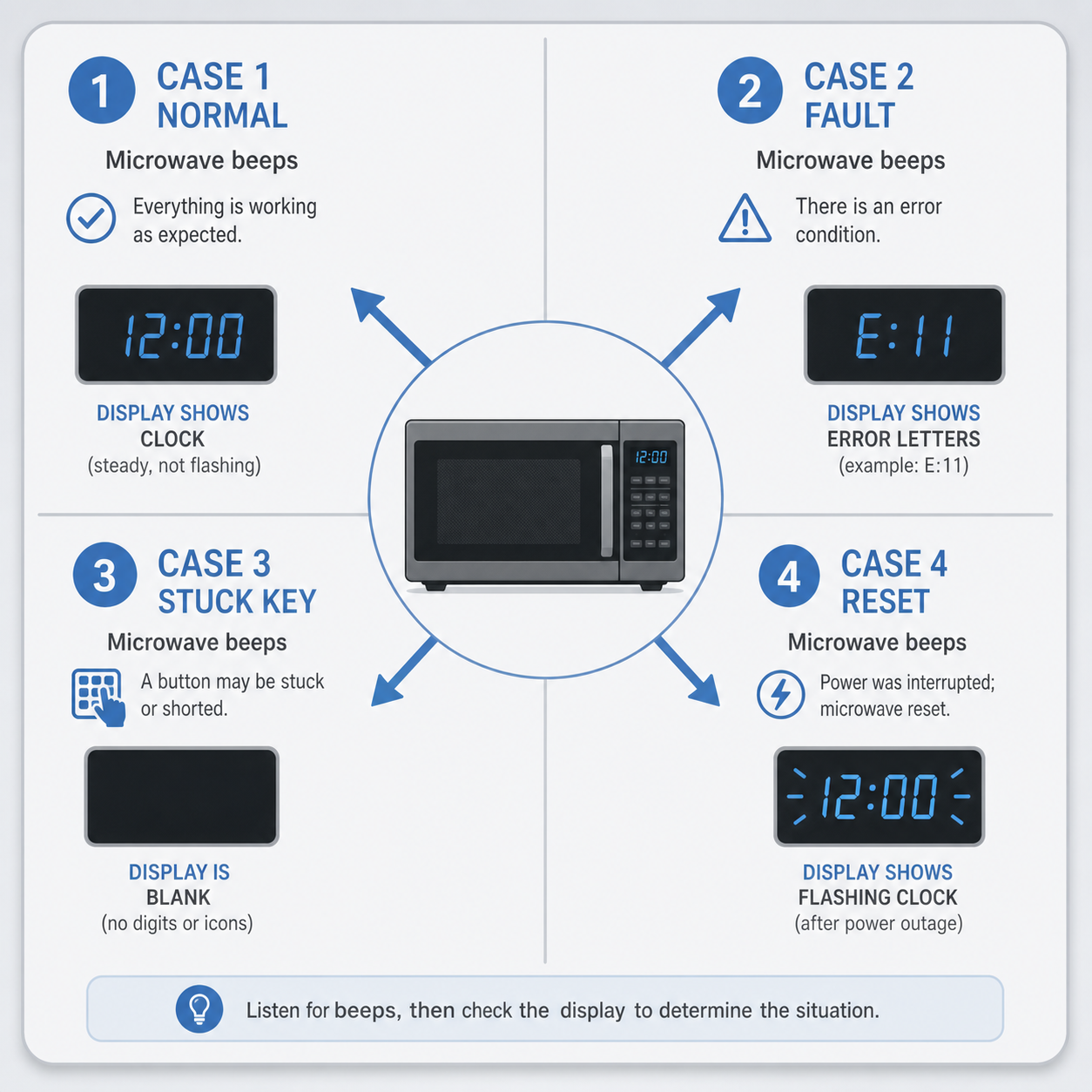
Microwave beeping falls into four cases. In most of them the fix is a setting change, a cleaning, or a quick reset — no tools required.
If your microwave beeps at you after heating food, it is just telling you dinner is ready. If it beeps randomly with letters and numbers on the display, something inside is asking for attention. If it beeps while sitting idle with a blank screen, the keypad or control board has a problem. And if it started beeping right after a power flicker, it likely just needs a clean restart.
This guide walks you through each case in order of likelihood so you can match yours fast and stop the noise without guesswork.
For other household alerts that follow similar logic — listen to the sound, check the display, then decide whether a reset or a mute is enough — see Dishwasher Beeping: Meaning and Fixes, Refrigerator Beeping: Meaning and Simple Fixes, and Garage Door Opener Beeping: Meaning and Fixes.
If you are hunting down an unknown beep in any room of the house, our Find Which Smoke Detector Is Beeping walks through identification by sound pattern across every category.
Identify your case in 60 seconds
Match the symptom on the left to the case on the right. Jump straight to that section.
| When does it beep? | What is on the display? | Case | Jump link |
|---|---|---|---|
| Right after you press start or open the door | Normal clock or timer text | 1 — End-of-cycle / door alert | Case 1 |
| After pressing a button, with letters and numbers on display | Error code (F-series, E-series, etc.) | 2 — Error code beep | Case 2 |
| While sitting idle, no food in it | Blank or very dim screen | 3 — Stuck key or panel fault | Case 3 |
| Right after a power flicker or outage returns | Clock flashing, then beeps once or twice | 4 — Power-surge scramble | Case 4 |
If none of these match, you are looking at something more specific to your brand. That is fine — skim the cases below and you will still find the right starting point.
Case 1: end-of-cycle and door alerts (normal)
Most microwave beeps in this category are intentional. The unit wants you to know a job finished or a door has been open too long.
End-of-cycle beep. A single tone, two tones, or three tones after the timer hits zero is standard across nearly every brand. It is the same kind of signal a timer sends when it runs out. Some models also beep once more if you leave the door open for roughly five minutes — a courtesy reminder that your food is still sitting there.
How to mute. Many microwaves let you turn end-of-cycle sounds off, but the path varies a lot by brand and model year:
- Panasonic / Sharp: Settings or Sound button, hold 1–3 seconds until you hear a tone confirming the change.
- LG: Touch “Sound” or “Volume,” then cycle to Off (not all LG models offer this; some only let you lower it).
- Samsung: Settings menu → Sound settings → turn End-of-cycle sound off. Some budget Samsung models have no mute option at all.
- GE / Haier: Hold the “Timer” or “Sound” key for a few seconds, then confirm with Start. Not every GE microwave includes this path.
- Whirlpool / Kenmore: Settings → Sound options → toggle End-of-cycle tone.
- Toshiba / Black+Decker / Insignia: Often no mute option; the beep is hard-coded into the firmware. If yours beeps and you cannot turn it off, that is typical for these brands.
If your microwave has a demo or store mode turned on, it will often chime repeatedly even when nothing is happening — this is a common cause of “constant chiming” on display models. Turn demo mode off using the same settings path.
Demo mode quick check. If the clock reads dE-1, C-F, or something similar and the unit beeps with no food inside, you are likely in demo mode. Switch it back to consumer mode (usually a key combination like holding Stop/Clear + +30 Sec for three seconds) — see your manual for the exact combo.
Case 2: error codes (the beep has letters and numbers)
When beeps pair with characters on the display, the microwave is reporting a fault. The specific meaning depends on brand, but common families include:
| Code family | What it usually signals |
|---|---|
F1xx / F2xx (Panasonic, Sharp) | Keypad or control-panel fault |
E-, Err- prefix (LG, Samsung) | Sensor or membrane issue |
Hxx / dE series (GE, Haier) | Temperature sensor or door-latch mismatch |
Single F letter with a digit (Whirlpool, Kenmore) | Internal board communication fault |
These are not universal — the same F1 code can mean different things on two brands. That is why the universal first move matters most:
Unplug for 60 seconds. Wait at least one full minute, then plug back in. This clears volatile memory faults that cause false codes. If the code returns immediately after restart, it was a real fault, not a glitch.
When a code means a part needs replacing. The most common DIY repair in this category is a membrane switch or keypad replacement. These cost $15–$40 and take 20–40 minutes with a screwdriver. Before you start that project, do the honest math: a used microwave of similar capacity often costs less than $80 on the secondary market. If your unit is more than seven years old, replacing the board may not be worth it — see When it’s not worth fixing for the full logic.
Warning: Never open the outer cabinet of a microwave to reach internal parts unless you are trained and understand capacitor hazards. A discharged-looking capacitor inside can hold a lethal charge long after unplugging. This article does not cover internal repair. If your code points inward, call a technician or replace the unit.
Case 3: beeping with blank or no display
A microwave that beeps while sitting idle and has nothing on its screen is usually pointing at one of two things: a stuck key under the keypad, or a failing control panel.
Stuck-key cleaning (safe first step).
- Unplug the microwave.
- Dampen a cloth with white vinegar or isopropyl alcohol — not water.
- Wipe around every key on the keypad, pressing each one firmly in and releasing it several times.
- Let it dry for five minutes, plug back in, and see if the beeping stops.
- If you are comfortable removing the outer screws (see safety warning above), you can also clean behind the keypad membrane — but only if you accept the capacitor risk or call a technician.
Control panel failure signs. If cleaning does not help, look for these patterns:
- Beeps at random intervals with no button press.
- Buttons that feel mushy or do not click.
- The display flickers in and out before beeping starts.
When you see two or more of those together, the control board itself is likely failing. At that point, replacement is usually more sensible than repair for a unit older than five years.
Child-lock accidentally on. Some models announce an active child lock with a specific beep pattern (often three short tones followed by silence). If you think it might be on: look for a key icon or padlock symbol on the display, then toggle it off using the same key combination your manual describes — usually holding Stop/Clear + Micro for three seconds.
Case 4: after a power outage or surge
A brief power flicker can scramble a microwave’s control board. When power returns, many units beep once or twice to confirm they are alive and then resume with the clock flashing.
Reset procedure.
- Unplug for one minute.
- Plug back in.
- Reset the clock (most models ask you to press
Clock+ a number key). - If it beeps again, repeat the unplug cycle once more — some boards need two clears to settle.
This kind of full-power reset works for microwaves, smoke detectors alike. For a step-by-step on resetting battery-powered alerts cleanly, see How to Reset a Smoke Detector.
If the beeping returns. A surge can also damage components beyond the control board. If the microwave started beeping within hours or days of a major storm and you did not have a whole-home surge protector plugged in, take that as a sign to have it inspected by a technician — especially if you notice any burning smell, warm spots on the cabinet, or food that stops heating properly.
The mute reference: brand-by-brand cheat table
This table lists typical mute paths for major brands. Paths vary by model year and capacity; always confirm in your manual before assuming a button does what this table says.
| Brand | Typical mute path | Models with no mute option |
|---|---|---|
| Panasonic | Settings → Sound → Off (or hold Sound 2–3 s) | Some compact Inverter models |
| LG | Touch Sound / Volume → cycle to Off | Older button-only models |
| Samsung | Settings → Sound settings → End-of-cycle Off | Budget/entry-level lines |
| GE (Haier-built) | Timer/Sound hold 3 s, confirm with Start | Many white-box Haier rebrands |
| Whirlpool / Kenmore | Settings → Sound options → toggle off | Some Kenmore Essentials models |
| Toshiba / Black+Decker | Usually no mute path; beep is hard-coded | Most models |
| Sharp | Settings or Sound button, hold to toggle | Older non-display models |
If your brand is not listed here, search “[Brand Name] microwave mute sound” plus your model number — the answer is usually a two-line entry in the user guide.
When it’s not worth fixing
Microwaves are cheap appliances. The repair-cost vs replace logic looks different from refrigerators or dishwashers:
- Under $80 model → replace, not repair.
- Over seven years old with a control-board code → lean toward replacement.
- Under three years old with a single stuck-key fault → keypad replacement is usually worth it.
- Any unit that smells like burning plastic after power returns → do not reuse it; replace.
Capacitor safety warning (read before any repair)
Warning: Microwave capacitors can hold a lethal charge. Even after unplugging for hours, the high-voltage capacitor inside a microwave can retain enough energy to stop your heart. This is why this guide never instructs you past the outer cabinet. If your model’s error code points inward — membrane switch, control board, transformer, magnetron — call a certified appliance technician or replace the unit. Never probe, discharge, or disassemble internal parts yourself.
FAQ
Q: Why does my microwave beep every minute with the door closed?
A: That is usually demo mode running (a constant chime loop) or a stuck key under the keypad. Check for a dE indicator on the display, then try unplug-for-60-seconds and clean the keypad.
Q: How do I mute my microwave permanently? A: Use the Sound or Settings button path listed in your brand’s cheat table above. If your model has no mute option (common with Toshiba/Black+Decker), there is no safe software way to silence it — accept the beep or replace.
Q: Why does my microwave beep when I press any key? A: That usually means a stuck key is sending a ghost signal while you are pressing another one. Unplug, clean the keypad thoroughly, and dry for five minutes before retrying.
Q: It still beeps after an unplug reset. What now? A: If it returns within seconds, your model has a real fault — most likely the membrane switch or control board. For units over seven years old, replacement is typically more cost-effective than repair.
Image Prompts
Placement: H2-1 (decision table). Concept: A clean four-quadrant decision card showing when a microwave beeps and what display state accompanies it — clock text → “case 1 normal,” error letters → “case 2 fault,” blank screen → “case 3 stuck key,” flashing clock after outage → “case 4 reset.” Composition: Minimalist flat illustration, soft gray background, each quadrant split by thin dividers, microwave silhouette in the center connecting all four quadrants with arrows. Use a calm blue accent palette consistent with the site’s editorial style.
Placement: H2-2 (mute paths). Concept: A close-up illustration of a typical microwave control panel with callout arrows pointing to common sound-control locations — Sound button, Settings entry point, hold-to-mute key combinations. Composition: Slightly angled top-down view of a generic panel, each target button highlighted with a subtle glow, label text in the site’s sans-serif typeface, no brand logos visible.
Placement: H2-7 (capacitor warning). Concept: A stern safety visual — a microwave with its outer cabinet outlined but clearly marked “DO NOT OPEN” with a bold red X and a high-voltage capacitor symbol beside it. Composition: Flat illustration, dark background strip at the top carrying the text “Capacitors hold lethal charge even when unplugged,” microwave shown in profile with a warning triangle overlay, no internal components visible — reinforces the article’s stance of staying outside the cabinet.