Your home security system is beeping and you don’t know why. Unlike smoke detectors with simple patterns, security panels use complex beep codes that signal everything from low batteries to sensor malfunctions. Here’s how to decode them and fix the problem without calling tech support.
Common Security System Beep Patterns
Single Beep When Door Opens/Closes:
- Normal operation—entry/exit chime
- Indicates door sensor working properly
- Can be disabled if annoying (check settings menu)
- Not an error condition
Three Beeps When Arming:
- Confirms system is arming
- Normal operation
- Indicates proper arming sequence
- Different from error beeps
Continuous Beeping (Rapid):
- Alarm triggered
- Exit delay countdown active (you have seconds to disarm)
- Entry delay countdown (disarm as soon as possible)
- Requires PIN code to silence
Single Beep Every 30-60 Seconds:
- Low battery warning (most common)
- Either panel backup battery or sensor battery
- Needs attention to stop beeping
- Won’t silence until battery replaced
Fast Beeping (5-10 Beeps in Succession):
- Trouble condition detected
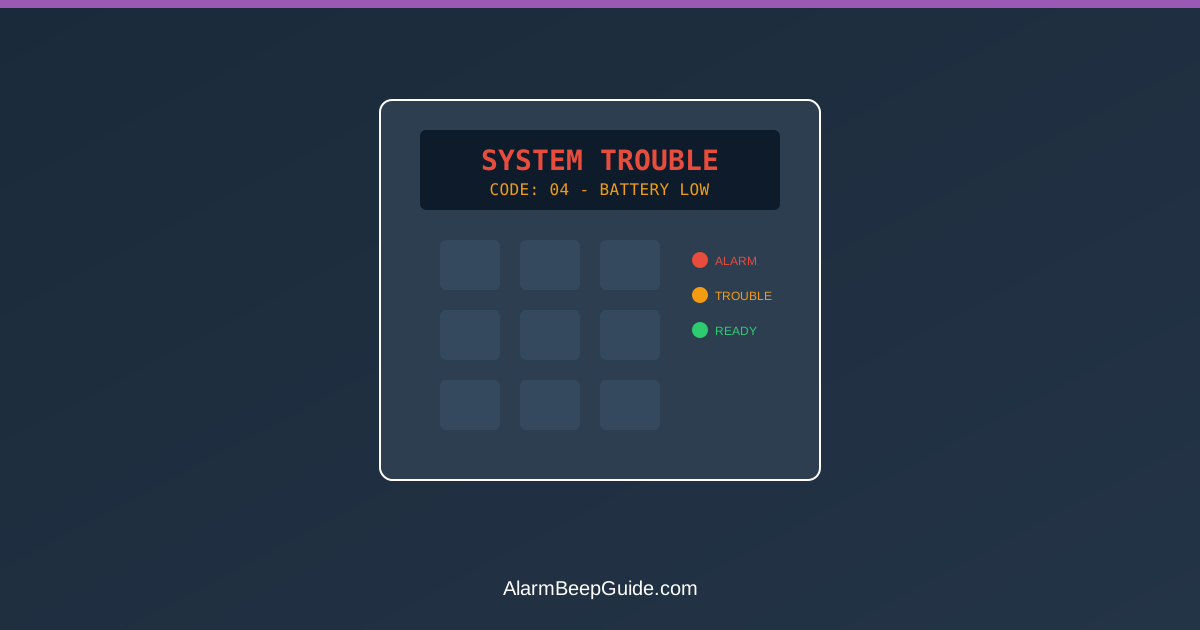
- Check keypad display for trouble code
- Could be sensor fault, communication error, or power issue
- Press * or the pound key to silence temporarily (must still fix problem)
Two Beeps Every Few Seconds:
- Tamper alert
- Panel cover or sensor opened without disarming
- Check all panel covers secure
- Verify sensors mounted properly
How to Find the Specific Problem
Step 1: Check the Keypad Display
Most panels show trouble codes:
- “BAT” or battery icon = Low battery
- “COMM” = Communication failure to monitoring station
- “CHK” + zone number = Sensor problem on that zone
- “TAMP” = Tamper detection
- “AC” or “PWR” = Power loss/AC failure
Step 2: Consult Your Manual
Security systems vary wildly by manufacturer:
- ADT panels differ from Ring systems
- Honeywell uses different codes than DSC
- Find model number on panel faceplate
- Search “[model number] beep codes” online
Step 3: Press the Status/Info Button
Many panels have a button that displays current system status and trouble conditions. Look for:
- “i” button
- “STATUS” button
- “*” + “2” combination
- pound key + 5 combination
Low Battery: The Most Common Cause
Panel Backup Battery: Large sealed lead-acid battery inside main panel box.
Symptoms:
- Regular beeping every 30-60 seconds
- “LOW BAT” or battery icon on display
- Beeping stops during power outages (runs on dying battery)
How to Replace:
- Disarm the system
- Open panel box (may need screwdriver)
- Disconnect old battery (note wire positions)
- Install new battery (match voltage—usually 12V)
- Reconnect wires (red to red, black to black)
- Close panel
- Clear trouble code (often *2 or pound key + 2)
Battery Type: Usually 12V 4Ah to 12V 18Ah sealed lead-acid. Check label on existing battery.
Replacement Cost: $15-40 depending on capacity.
Sensor Battery: Wireless sensors use AA, AAA, or CR123A lithium batteries.
How to Identify Which Sensor:
- Check keypad display for zone number
- Consult zone list (often inside panel door)
- Replace battery in that specific sensor
- Clear trouble code
Communication Failure Beeping
What It Means: Panel can’t reach monitoring station or your phone via cellular or internet connection.
Common Causes:
- Internet outage (if system uses broadband)
- Cellular module failure (if system uses cellular)
- Phone line cut (if system uses landline—rare now)
- Service expired/account cancelled
How to Fix:
- Check your internet connection (restart router)
- Verify monitoring service account is active
- Check cellular signal strength if applicable
- Contact monitoring company if persistent
Temporary Silence: Usually *2 or press “OFF” twice, but varies by system.
Sensor Fault Beeping
What It Means: A specific door/window sensor, motion detector, or glass break sensor has a problem.
Common Sensor Problems:
- Low battery in wireless sensor
- Sensor misalignment: Door/window sensor magnets not aligned
- Tamper switch: Sensor cover removed or sensor pulled from wall
- Sensor failure: End of life or damage
Diagnosis:
- Identify zone number from keypad
- Locate that sensor
- Visual inspection:
- Battery compartment secure?
- Sensor and magnet within 1/2 inch?
- Sensor mounted firmly?
- Replace battery or realign sensor
- Test by opening/closing door or triggering motion
Quick Fix for Misaligned Sensors: Door/window sensors have two parts—sensor on door frame, magnet on door. If gap is too wide:
- Adjust sensor mounting position
- Add shim/spacer to reduce gap
- Verify magnet side and sensor side are properly positioned
Tamper Alert Beeping
What Triggers Tamper Alerts:
- Opening panel box without disarming
- Removing sensor cover
- Removing sensor from mounting bracket
- Cutting wires on hardwired sensors
Why Systems Have This: Prevents intruders from disabling system by destroying sensors.
How to Clear:
- Ensure all panel covers secure
- Check all sensors properly mounted
- Disarm system with PIN
- Enter tamper reset code (varies—check manual, often *2 + PIN)
If Tamper Won’t Clear: Sensor may be damaged. Replace it or call tech support.
AC Power Loss Beeping
What It Means: Panel lost main electrical power and running on backup battery.
Why It Beeps: Warns you the backup battery won’t last forever (typically 4-24 hours depending on capacity).
What to Do:
- Check if whole house lost power or just panel circuit
- Check circuit breaker
- Verify panel power supply plugged in securely
- If breaker tripped repeatedly, call electrician
- If house power is out, system will auto-restore when power returns
Silencing During Outages: Some panels allow temporary silence of power loss beeping. Check manual for “power trouble silence” procedure.
Phantom Beeping: Hard to Diagnose Causes
Old Batteries Causing Intermittent Beeps: Even “working” batteries can cause issues as they age. Replace panel battery every 3-5 years preventively.
Environmental Interference: Extreme heat/cold in sensor locations can cause false trouble codes, especially with wireless sensors.
Low Cellular Signal: If your system uses cellular communication, weak signal causes intermittent comm failures.
Firmware Issues: Rare, but panels can glitch. Power cycle the panel (disconnect AC and battery for 30 seconds, reconnect).
System-Specific Quirks
ADT Pulse/Command Panels:
- Press “Off” twice to silence trouble beeps
- Check app for detailed trouble codes
- Cellular comm errors common if account inactive
Ring Alarm:
- Base station beeps for sensor issues
- Check Ring app for specific problem
- Battery changes auto-detected and reported in app
Honeywell/Ademco:
- Press “*2” to see trouble conditions
- Press “#” + installer code to silence (installer code often 4112 or 6321 default)
- Battery low shows as “FC” on some models
DSC Panels:
- Press “*2” for trouble display
- Press “#” to scroll through troubles
- “TBL” light indicates trouble condition
Simplisafe:
- Base station voice announces problem
- Check app for specific issue
- Sensor battery changes very straightforward
When Professional Help Is Needed
Call Your Monitoring Company If:
- Communication errors persist after internet/router restart
- You can’t identify problem from error codes
- System won’t arm due to persistent fault
- You don’t know PIN or master code
Call a Technician If:
- Panel backup battery repeatedly dies quickly
- Multiple sensors failing simultaneously
- Wiring appears damaged
- Panel shows “system failure” or “call service”
DIY Limitations: Modern security systems are mostly user-serviceable for battery changes and sensor adjustments, but communication module and panel failures need professional diagnosis.
Preventing False Beeps and Trouble Codes
Proactive Maintenance:
- Replace panel battery every 3-4 years (before it fails)
- Replace sensor batteries annually (or use lithium 10-year batteries)
- Test system monthly
- Keep sensor magnets aligned (check after seasonal temperature swings)
- Dust sensors and panel box annually
Environmental Considerations:
- Don’t mount sensors in extreme temperature locations if avoidable
- Keep panel in climate-controlled space
- Protect outdoor sensors from weather exposure
- Avoid placing sensors near heat sources
Silencing Beeps: Temporary vs. Permanent Fixes
Temporary Silence (Acknowledges trouble but doesn’t fix): Most systems: *2, or “OFF” twice
- Stops beeping for 4-24 hours
- Problem remains
- Beeping returns if not fixed
Permanent Fix (Actually resolves problem):
- Replace low battery
- Repair sensor fault
- Restore communication
- Clear trouble code after fixing
Never Ignore: Trouble beeps indicate real problems. Temporarily silencing is fine while you diagnose, but always fix the underlying issue.
Exit and Entry Delay Beeping
What It Is: Countdown beeping when you arm system and leave, or when you enter before disarming.
Exit Delay:
- Beeps slowly for 60 seconds (typical)
- Gives you time to leave before system arms
- Speed increases as time runs out
- Normal operation, not an error
Entry Delay:
- Rapid beeping when you open door while armed
- Usually 30-60 seconds to disarm before alarm triggers
- Disarm as soon as possible with PIN
- This beeping is intentional—warns intruders too
Can’t Be Disabled: Exit/entry delays are critical security features. You can adjust delay length in programming but not eliminate beeping.
False Alarm Beeping After Alarm Event
What Happens: System triggered, alarm sounded, you disarmed it, but beeping continues.
Why: Many panels beep to remind you an alarm occurred and may need attention:
- Monitoring station may call
- Sensor that triggered alarm may have issue
- System memory holding alarm event
How to Clear:
- Disarm with PIN
- Enter alarm memory clear code (check manual, often *3 or pound key + 6)
- Check system log to see which sensor triggered
- Verify that sensor is working properly
Smart Security Systems: App-Based Alerts
Modern Advantage: Ring, Simplisafe, ADT Command, and similar systems send push notifications instead of just beeping.
Benefits:
- See specific problem right away
- Remote troubleshooting from phone
- Clear English explanations, not beep codes
- Battery status monitoring prevents surprise beeping
Old-School Panels: No app connectivity. Must physically check keypad display and manually decode beeps.
Beeping After Power Outage
Why It Beeps: Panel warns you it’s running on battery backup during outage.
What to Do:
- Normal behavior during outages
- Panel auto-restores when power returns
- Beeping stops when AC power detected
- If beeping continues after power restoration, check circuit breaker
Battery Drain: Typical backup battery lasts 4-24 hours depending on capacity and sensor count. Minimize door openings to conserve battery.
The Bottom Line
Security system beeping almost always means low battery (panel or sensor), communication failure, or sensor fault. Check your keypad display for specific trouble codes, and consult your manual for system-specific beep patterns.
Replace panel backup batteries every 3-4 years and sensor batteries annually to prevent surprise beeping. Press *2 or “OFF” twice to silence temporarily while you diagnose, but always fix the underlying problem.
Try not to disconnect the system just to stop the beeping; it can hide real issues that need attention. Fix it properly, and the system will stay quiet until it needs to alert you.
FAQ
Why is my security panel beeping every minute?
Related Articles
- ADT Alarm Beeping: How to Stop — ADT-specific troubleshooting
- Best Home Security Systems With No Monthly Fee — self-monitored options
- How to Choose a Home Alarm System — buying guide
- Do You Need a Home Security System? — is it worth it?