If your smoke detector chirps at night, you’re not imagining things — there’s a real reason it happens at 2 AM and not during the day. The combination of cooler nighttime temperatures, lower humidity, and reduced battery voltage creates the perfect conditions for a low-battery chirp. This guide explains exactly why nighttime chirping happens and gives you a step-by-step fix that works the same night.
Why Smoke Detectors Chirp at Night
Three factors combine to make nighttime the most common time for smoke detector chirping.
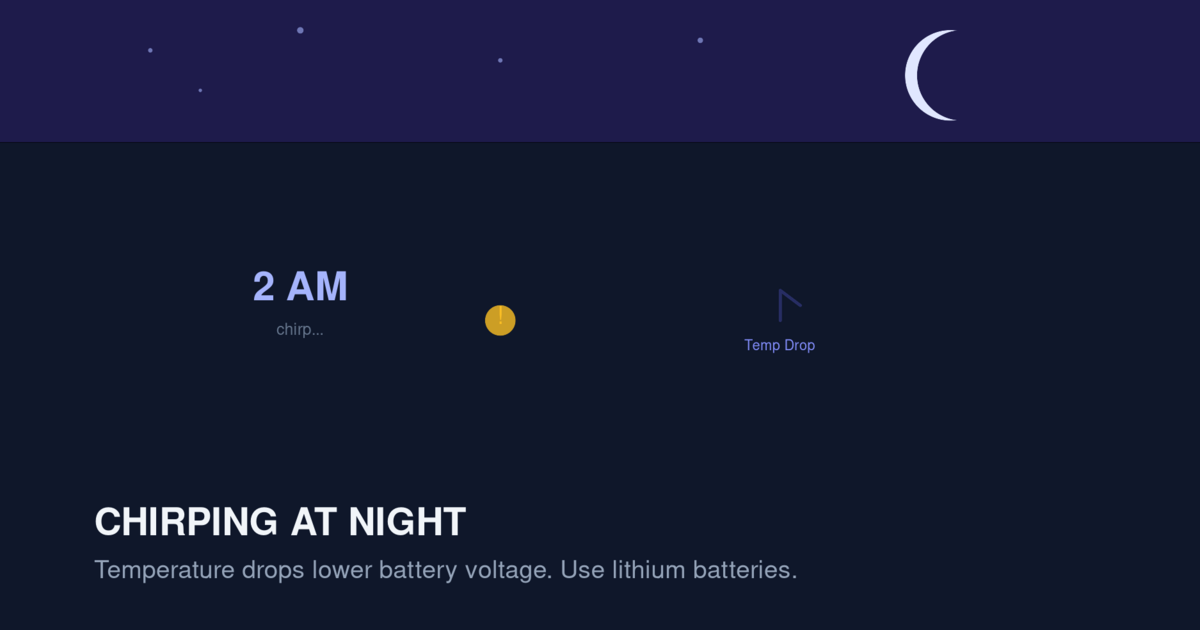
Temperature Drops
Most homes are 3-5°F cooler at night than during the day, either because the thermostat is set lower for sleeping or because outside temperatures drop. A battery’s voltage drops slightly as temperature decreases — this is basic battery chemistry. A battery that reads “OK” at 70°F during the day may drop below the low-battery threshold at 65°F overnight.
This is especially true for alkaline batteries. Alkaline voltage drops approximately 0.1V for every 10°F decrease in temperature. A 9V battery that reads 8.5V at 70°F may read 8.3V at 60°F — just below the low-battery threshold for most smoke detectors.
Lithium batteries are less affected by temperature but still show some voltage variation.
Humidity Drops
Nighttime humidity is often lower than daytime humidity, especially in winter when heating systems run continuously. Lower humidity can cause static electricity buildup, which interferes with the smoke detector’s electronics. Some detectors interpret this static as a sensor error and trigger a chirp.
Lower humidity also affects battery performance. Alkaline batteries can lose capacity faster in dry conditions.
Quiet Environment
This isn’t a cause of chirping, but it makes you more aware of it. During the day, household noise (TV, conversation, HVAC fans) masks the chirp. At night, the only sound is the chirp itself, which seems louder than it actually is.
The Most Common Causes of Nighttime Chirping
While the temperature/humidity factors explain why chirping happens at night, the underlying problem is usually one of these:
Low Backup Battery in Hardwired Detectors
Hardwired smoke detectors have a backup battery that takes over during power outages. If the backup battery is old or weak, the detector may chirp at night when temperatures drop and the battery voltage falls below threshold. The detector is technically working off household AC power, but the chirp comes from the battery monitoring circuit, which checks voltage continuously.
This is the most common cause of nighttime chirping in hardwired systems.
Aging Main Battery in Battery-Only Detectors
If you have a battery-only smoke detector, the battery is the sole power source. As batteries age, their voltage drops gradually. By the time a battery is 50% depleted, it may still work fine during the day but fail the voltage check at night.
End-of-Life Warning
Many smoke detectors chirp at night as an end-of-life warning. The chirp pattern is different — usually a single beep every 30 seconds — and it indicates the sensor itself is aging. End-of-life chirping typically starts at night and gradually occurs during the day as well.
Temperature-Sensitive Component Failure
A small percentage of smoke detectors have component failures that are temperature-sensitive. A failing capacitor or resistor may work fine at room temperature but fail when the temperature drops slightly. This is more common in older detectors and in budget brands.
Quick Fix: Silence the Chirp Tonight
If your smoke detector is chirping at 2 AM and you need to silence it now:
Press and hold the test/hush button for 5 seconds. Most detectors will silence the chirp for 8-12 hours. This gives you time to fix the underlying problem in the morning.
If pressing the button doesn’t work, open a window. Increasing airflow and humidity can sometimes stop temperature-induced chirping. This is a temporary measure.
If the chirp continues, remove the battery. For battery-only detectors, removing the battery stops the chirp immediately. For hardwired detectors, you can also remove the backup battery, but leave the unit connected to AC power (the chirp should stop).
Important: Removing the battery disables the smoke alarm. Do this only as a temporary measure, and reinstall a fresh battery within 24 hours.
The Real Fix: Replace the Batteries
Pressing the test/hush button silences the chirp but doesn’t fix the underlying problem. The chirp will return. To permanently stop the chirp, replace the batteries.
What Batteries to Use
For best results, use lithium batteries rather than alkaline:
Lithium AA batteries (Energizer Ultimate Lithium recommended):
- Last 5-10 years in battery-only smoke detectors
- Maintain stable voltage across temperature changes
- Less likely to leak and damage the detector
- More expensive upfront ($15-25 per pack of 8)
Alkaline AA batteries:
- Last 1-2 years in smoke detectors
- Voltage drops with temperature
- More likely to leak, especially in older detectors
- Cheaper upfront ($5-10 per pack of 8)
Lithium 9V batteries:
- Used in some older hardwired detectors
- Last 5+ years
- Recommended over alkaline 9V for the same reasons
Sealed 10-year lithium detectors:
- The entire detector has a sealed lithium battery
- No battery replacement needed — replace the whole detector after 10 years
- Recommended for all new installations
How to Replace the Batteries
For battery-only detectors:
- Get a stepladder and a fresh set of lithium batteries
- Twist the detector counterclockwise to remove it from the mounting bracket
- Open the battery compartment (usually a slide or tab on the back)
- Remove the old batteries
- Insert the new batteries, matching the +/- orientation
- Close the battery compartment firmly
- Press and hold the test button for 5 seconds to verify the detector works
- Twist the detector back onto the mounting bracket
The whole process takes 2-3 minutes per detector.
For hardwired detectors:
- Turn off the breaker for the smoke detector circuit
- Twist the detector counterclockwise to remove it from the bracket
- Disconnect the wiring harness (press the tab and pull)
- Open the battery compartment
- Replace the backup battery with a fresh lithium battery
- Reconnect the wiring harness
- Mount the detector back on the bracket
- Turn the breaker back on
- Press and hold the test button to verify
For hardwired detectors, allow 5-10 minutes per detector.
Why Lithium Batteries Prevent Nighttime Chirping
Lithium batteries maintain more stable voltage across temperature ranges than alkaline. The voltage of a fresh lithium AA battery is approximately 1.7V, compared to 1.5V for alkaline. As both batteries discharge:
- A lithium battery drops gradually from 1.7V to about 1.0V over its lifespan
- An alkaline battery drops from 1.5V to about 0.8V, but the voltage curve is steeper in the final 30% of life
When temperatures drop at night:
- A lithium battery at 50% capacity may drop from 1.4V to 1.35V — still above the low-battery threshold
- An alkaline battery at 50% capacity may drop from 1.2V to 1.1V — potentially below the low-battery threshold
This is why alkaline batteries cause nighttime chirping even when they appear to have plenty of capacity left. The chemistry is working against you.
Other Causes of Nighttime Chirping
If replacing the batteries doesn’t stop the chirp, the problem is something else.
Detector End-of-Life
All smoke detectors have a finite lifespan. The sensor inside degrades over time, and the detector must be replaced. Most detectors signal end-of-life with a chirp pattern.
End-of-life chirps typically:
- Occur every 30 seconds (different from the 60-second interval for low-battery chirps)
- Are accompanied by a yellow or red LED flash
- Continue even after battery replacement
- May include a voice announcement like “Replace detector” on smart models
If your detector is past its 10-year expiration date, replace it. For details, see our How Often to Replace Smoke Detectors guide.
Sensor Trouble
If the sensor itself is failing (not the battery), the detector will chirp to alert you. Sensor trouble chirps:
- Occur every 30-60 seconds
- Continue after battery replacement
- Are accompanied by LED patterns indicating a fault
The fix is usually to clean the sensor. Use compressed air to blow out the vents, then use a soft brush to remove dust. If the chirp continues after cleaning, the sensor is likely failing and the detector needs replacement.
Interconnected System Fault
If you have interconnected hardwired detectors, one detector may chirp because of a communication fault with the others. This is more common in older interconnected systems.
To diagnose: When the chirp starts, check the LED on each detector. The detector with a flashing red or yellow LED is the source of the problem. Replace the battery in that specific detector first, then clean it.
If the chirp continues after battery replacement and cleaning, the detector itself is faulty and needs replacement.
Power Supply Issues
In rare cases, the chirp is caused by an electrical issue rather than a battery issue. Symptoms include:
- Chirping that coincides with other electrical events (lights flickering, etc.)
- Chirping that affects multiple detectors simultaneously
- Chirping that stops when you turn off the breaker for the smoke detector circuit
These issues require an electrician to diagnose and fix. Common causes include:
- Loose wiring at the electrical panel
- Voltage drops from high-load appliances
- Failed AC adapter in the smoke detector circuit
Dust and Insects
In some homes, dust or small insects get inside the detector’s sensing chamber and trigger false alerts. The detector may chirp after a false alarm event as a “memory” indicator.
To clean: Remove the detector from the ceiling, use compressed air to blow out the vents, then use a soft brush to remove any visible debris. Do not open the detector’s case or touch the internal sensor.
Preventing Nighttime Chirping Long-Term
These steps will prevent the chirping from happening again.
Step 1: Replace All Batteries with Lithium
Replace every battery in every smoke detector with fresh lithium batteries. Don’t mix lithium and alkaline — use the same chemistry throughout your home.
Step 2: Replace Aging Detectors
If any detector is more than 10 years old, replace it. The manufacture date is printed on the back of the detector. Don’t try to extend the life of an expired detector — the sensor is no longer reliable.
Step 3: Clean Every Detector Annually
Once a year, remove each detector and clean it with compressed air and a soft brush. This removes dust and small insects that can trigger false alerts.
Step 4: Test Every Detector Monthly
Press and hold the test button on each detector once a month. If a detector doesn’t respond, replace the battery. If it still doesn’t respond after a battery replacement, replace the detector.
Step 5: Keep a Spare Set of Batteries
Keep a pack of fresh lithium batteries in a kitchen drawer. When a detector starts chirping at 2 AM, you can fix it immediately instead of waiting until the hardware store opens.
When to Replace the Detector vs. Just the Battery
Sometimes the issue isn’t the battery — it’s the detector itself.
Replace Just the Battery If:
- The detector is less than 10 years old
- The chirp started recently (within the last few days)
- The chirp stops after battery replacement
- The detector passes the test button check after battery replacement
Replace the Detector If:
- The detector is more than 10 years old
- The chirp continues after battery replacement
- The detector fails the test button check
- The chirp is accompanied by LED patterns indicating a sensor fault
- The detector has visible physical damage (cracked case, water damage, etc.)
- The detector has been recalled
For a recalled detector, see our Kidde Smoke Detector Recall Guide for active recall information.
The Nighttime Chirp vs. The Fire Alarm
A chirp is different from a fire alarm, and confusing them can be dangerous.
Chirp Characteristics
- Single short beep
- Repeats every 30-60 seconds
- Quieter than a fire alarm
- Indicates maintenance issue, not danger
Fire Alarm Characteristics
- Loud, continuous beeping (typically 3 beeps in a row, repeating)
- 85+ decibels
- Repeats rapidly (every few seconds)
- Indicates active danger — evacuate immediately
If you’re hearing a chirp, it’s a maintenance issue. If you’re hearing a fire alarm, treat it as a real fire and evacuate. For full details on what 3-beep alarms mean, see our Smoke Detector Beeping 3 Times guide.
Special Case: Smart Detectors
If you have a smart smoke detector (Nest Protect, First Alert SC5, etc.), the app provides specific information about why the detector is chirping.
What the App Tells You
The smart detector’s app shows the exact reason for a chirp:
- “Low battery”
- “Sensor problem”
- “Wi-Fi disconnected”
- “Expired”
- “Hardware error”
Each reason has a specific fix, which the app walks you through.
Why Smart Detectors Chirp Less at Night
Smart detectors have better battery monitoring than basic detectors. They know the exact battery percentage and can predict when the battery will fail. They typically alert you through the app days before the chirp starts, giving you time to replace the battery during the day.
If your smart detector is still chirping at night despite the app alerts, see our Nest Protect Chirping guide for brand-specific troubleshooting.
FAQ
Why does my smoke detector only chirp at night?
The combination of cooler temperatures and lower humidity at night reduces battery voltage. A marginal battery passes the voltage check during the day but fails at night. The chirp is the detector telling you to replace the battery.
Can I just remove the battery to stop the chirp?
Yes, but only as a temporary measure. The detector is disabled without a battery. Replace the battery within 24 hours to restore protection.
Will a new battery stop the chirping?
Usually yes. If the chirp continues after a fresh battery, the detector itself is failing and needs replacement.
How do I know if the chirp is low battery or end-of-life?
Low-battery chirps occur every 60 seconds. End-of-life chirps occur every 30 seconds and are often accompanied by LED patterns. End-of-life chirps continue even after battery replacement.
What is the best battery for smoke detectors?
Lithium batteries. Energizer Ultimate Lithium AA batteries are the industry standard. They last 5-10 years, maintain stable voltage across temperatures, and are less likely to leak.
Can I use rechargeable batteries in smoke detectors?
No. Rechargeable batteries have a lower nominal voltage (1.2V vs 1.5V for alkaline and 1.7V for lithium), which triggers low-battery warnings even when the battery is fully charged.
Why does my smoke detector chirp even after I changed the battery?
The most likely cause is that the detector needs a hard reset. Press and hold the test button for 15-20 seconds to drain residual charge. If the chirp continues, the detector itself is failing.
Should I replace all smoke detectors at once?
If they’re all the same age, yes. Replacing them all at once ensures consistent performance and lets you standardize on one battery type.
Can cold weather cause smoke detectors to chirp?
Yes. Cold temperatures reduce battery voltage and can cause false alerts. This is more common in unheated spaces like garages and attics.
How do I stop my smoke detector from chirping without disabling it?
Press and hold the test/hush button for 5 seconds. This silences the chirp for 8-12 hours without disabling the detector.
Related Articles
- Why Is My Smoke Detector Chirping? 9 Common Causes — broad troubleshooting for any chirp
- Smoke Detector Low Battery Chirp Won’t Stop — specific fix for persistent low-battery chirps
- Hardwired Smoke Detector Beeping — for hardwired systems
- How Often to Replace Smoke Detectors — replacement timeline
- Nest Protect Chirping — brand-specific guide for Nest Protect owners